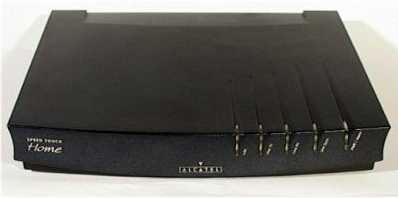
 Each modem has six lights, five on the front and one on the rear.
Note: this page talks about shared-line DSL service. If you have dedicated-line DSL service please see the page about troubleshooting dedicated-line DSL service.
Here are some steps to follow in troubleshooting your shared-line DSL service.
First, please keep in mind that your Coop is a volunteer organization. If you can figure what is wrong and fix it yourself, you will be saving a volunteer from having to fix it for you.
Second, try as hard as possible to figure out whether the problem is something the Coop is even able to fix and is responsible for fixing. If the problem is in your home or is in your computer, then the Coop is not responsible for fixing it, and if you make a volunteer come to your home to fix a problem that is not the Coop's responsibility, you will be responsible for a nice gift for the volunteer, such as a couple of bottles of expensive wine.
Third, please check simple things that could make a difference. For example, does your DSL modem have electric power? Is its "line sync" light on (see below)? Does your DSL router have electric power?
Is the problem that you are able to receive email but not send it? Then you may need to check the SMTP setting of your computer. You should try an SMTP server setting of "smtp.rric.net" to see if that fixes the problem.
Are you able to visit web sites (preferably using Netscape)? If the answer is "yes," then the Coop's service is working. Whatever is wrong is not the Coop's responsibility.
Do you have more than one computer? If so, please consider trying each computer. If one of the computers works and the other does not, then the Coop's service is working.
Try to reach your DSL router. Open a web browser (preferably Netscape) and visit the IP address for your DSL router (referring to the user manual for your DSL router). It may be 192.168.123.254 or 192.168.2.1, for example. If you can't reach it, then there is probably some problem with your router or your computer. If you are able to reach your DSL router, what does its "status" page say about the connection to the Internet?
Try "pinging" a few IP addresses. On a Windows machine, click start/programs and go to the MS-DOS prompt, and type "ping 206.168.112.1" to see if you can ping that IP address. Try again with 206.168.115.129. The results of these tests will help your volunteer to try to fix things.
Are your neighbors also having trouble with their Coop DSL service? This information will help your volunteer figure out how to fix the service.
Your DSL modem is an Alcatel Speed Touch Home modem.
Each modem has six lights, five on the front and one on the rear.
| LAN | line TX | line RX | line sync | power/alarm | rear light |
| This light flashes intermittently when there is traffic on the ethernet link (to your router) | This light flashes intermittently when traffic is transmitted to the Internet | This light flashes intermittently when traffic is received from the Internet | This should be solid green all the time. If it is blinking then it is trying to synch with the DSLAM in the barn, and has not yet succeeded. | This should be solid green all the time. When you first turn on the modem this will be blank and then red and eventually solid green. | This indicates a good ethernet connection to your router. It should be green all the time. |
Tip. Make a note of the usual condition of the lights when the system is working normally. Normally you would expect the following lights to be on (green) all the time: line sync, power, and the rear light. Normally you would expect to see blinks on the LAN, line TX, and line RX lights as data passes through the DSL modem.
Troubleshooting. If the "power" light is off, check to see if power is connected. If the "line sync" light is off, check to be sure the telephone cable has not gotten disconnected. If the rear light is off, check to see if there is a good ethernet cable connecting the DSL modem to other equipment. A persistent "off" condition for the "line sync" light may mean that repair work by the Coop is needed.
What do do if you have trouble with your voice line. Because you have shared-line service, a single pair of telephone wires is being used both for voice telephone service and for the DSL. This means that if you have trouble with your voice telephone service and if you call up Qwest repair service, they will have to try to figure out whether the problem with the voice service is somehow caused by the DSL.
Your voice service, as shown in the figure, comes from Qwest. It goes into the barn where it is combined with the DSL signal in a splitter. It comes back out of the barn and comes to your house.

At your house the signal goes into another splitter, shown in this photograph. It goes into the splitter at the "network" terminal. The voice and data signals are separated. The voice signal goes to the telephones in your house and the data signal goes to your ADSL modem.

As you can appreciate, a Qwest repair person who is considering all of the possibilities must consider the possibility that the voice service is broken due to something in the barn in which case it is the Coop's responsibility. While this is quite unlikely, the repair person must nonetheless consider this possibility. Probably you can save some time and trouble by contacting the Coop first when you are having trouble with your voice service.
Here are some things to consider:
Note: if you have not already done so, please print out this page and keep it handy for use in troubleshooting problems with your DSL service.